




























































The Regina Pats are going digital with their ticketing for the 2021-22 WHL season! You can use your mobile phone to manage and access your mobile tickets!
Through Ticketmaster SafeTix™, you can manage your tickets with peace of mind, thanks to leading-edge technology and fraud protection.
HOW TO ACCESS YOUR DIGITAL TICKETS
1) Head to am.ticketmaster.com/reginapats and click the  symbol in the top right corner to sign in.
2) Enter your My Pats Account or Ticketmaster credentials. If you don’t know your password click on Forgot Password to start a password reset process.
3) Choose the appropriate date.
If you’re a Season Ticket Holder, Split Season Ticket Holder or Front Half/Back Half Season Ticket Holder, you will see all the games you have tickets for this season under MY EVENTS. If you have purchased single game tickets, just that one event will appear.

4) When you hit SELECT EVENT, your game ticket(s) should now appear with an individual bar code for each ticket. Swipe to access any additional tickets you have for that game. On the day of the game, follow these steps to bring up the bar code and be ready for it to be scanned.

*Please note that with Ticketmaster SafeTix™, you cannot take a screenshot of your barcode. A new and unique barcode is automatically refreshed every 15 seconds.*
DOWNLOAD YOUR DIGITAL TICKETS TO AVOID GAME DAY HASSLES
To have faster access to your tickets and save time in line, we recommend that you download your tickets before game day. To do so:
- Select the game you wish to load tickets for.
- Click the ticket you wish to add and then select the “Add to Apple Wallet” or “Add to Google Pay” button
- Click Add this Ticket or all tickets to add to the wallet.
- Once added, you can view the ticket in your wallet. This means you can access your tickets without an internet connection.
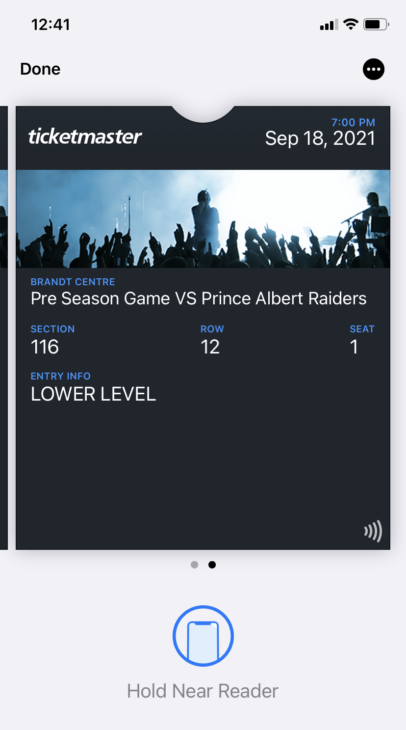
Please note: If a ticket that has been added to your Apple Wallet or Google Pay app is later transferred to a friend, a new ticket will be issued and the ticket in your wallet will be invalidated.
DO I HAVE TO GO DIGITAL?
While mobile ticketing is the way the industry is headed because it is easier to sell your tickets and is more secure, Pats fans who do not own a smart phone can still get their tickets printed at the Pats Business Office, for a small fee. Ticket printing will only be done in person at the office and must be arranged prior to pick-up.
TRANSFER
- From your My Pats Account dashboard, click MY EVENTS.
- Click TRANSFER and select the seats you want to transfer. When all the events and seats have been selected, click SEND.
- Review the summary and enter the recipient details. Click SEND.
- An email with a link will be sent to the recipient to claim their tickets.
CANCEL TRANSFER
- Follow steps 1-3 under ‘Managing Your Tickets’
- Transferred tickets will show the name of the recipient along with the status of the ticket. To reclaim your ticket BEFORE the recipient has claimed it, click CANCEL TRANSFER
- Then click RECLAIM and the ticket will be returned.
CLAIMING TICKETS
- Open the email and click ACCEPT TICKETS.
- You’ll be taken to the My Pats Account sign in page. Log in or create an account, using the same email address the tickets were sent to.
- Once logged in you’ll see the exact ticket details. Click ACCEPT
- The event will be added to your account and the tickets are ready to be managed.
TRANSFER TICKETS FOR MULTIPLE EVENTS
- Follow steps 1-2 under ‘Managing Your Tickets’
- Click TRANSFER near the top of the event list.
- Select all events you wish to transfer tickets for and click NEXT.
- Choose whether you’d like to transfer the same seats from all events or select specific seats for each event.
- If you choose to transfer the same seats but the seats don’t match across all events, you’ll be prompted to select specific seats. Click the arrow under each event and select the seats you wish to transfer. Once all seats are selected click NEXT.
- Review your selected seats and enter the name and email of the recipient.
- An email with a link will be sent to the recipient to claim their tickets.
SELL
- Follow steps 1-4 under ‘Managing Your Tickets’
- Click SELL and select the tickets you want to post for sale. Then click CONTINUE.
- Enter your selling price per seat and click CONTINUE.
- Select how you would like to receive payment and click CONTINUE.
- Click SELL TICKETS.
DONATE – Donation cut off: 3 days prior to event
- Follow steps 1-4 under ‘Managing Your Tickets’
- Click DONATE (by clicking the 3 dots ‘…’ to view further options) and select the tickets you wish to donate and click SEND to confirm.
- Select a charity from the dropdown menu and click CONTINUE.
- Agree to the terms and click CONFIRM.
REDEEMING TREAT A FRIEND VOUCHERS
- Login to My Pats Account
- Navigate to the My Events tab on the top tool bar.
- Select the 2019-20 Treat a Friend Event – listed on the last game of the season
- Click EXCHANGE (by clicking the 3 dots ‘…’ to view further options), you will be redirected to another page.
- Click EXCHANGE SEATS and select the number of vouchers you want to exchange, then click EXCHANGE (#) near the top right corner.
- A list of eligible Pats games will appear. Select the game you’d like to attend and click CONTINUE at the bottom of the page.
- The interactive seat map will appear, select your seats and then click CHECKOUT.
- Review and confirm the exchange.
- Select your delivery method and check the agree to terms & conditions box. Click CONTINUE.
- Select the check box to confirm you want to complete the redemption, then click PURCHASE TICKETS.
REDEEMING FLEX VOUCHER
- Login to My Pats Account
- Navigate to the My Events tab on the top toolbar.
- Select the Flex Voucher Event – listed on the last game of the season
- Click EXCHANGE (by clicking the 3 dots ‘…’ to view further options), you will be redirected to another page.
- Click EXCHANGE SEATS and select the number of vouchers you want to exchange, then click EXCHANGE (#) near the top right corner.
- A list of eligible Pats games will appear. Select the game you’d like to attend and click CONTINUE at the bottom of the page.
- The interactive seat map will appear, select your seats and then click CHECKOUT.
- Review and confirm the exchange.
- Select your delivery method and check the box to agree to the terms & conditions. Click CONTINUE.
- Select the check box to confirm you want to complete the redemption, then click PURCHASE TICKETS.